
TUI and CLI workflows
User docs
This page is part of the Platonic 0.2.2 operating guide.
Start an interactive thread
Section titled “Start an interactive thread”Run Plato Agent from a registered Git workspace:
platoBare plato in a terminal ensures the host server and selects a workspace profile. With no profiles it prompts for a name, checks provider readiness, creates one, and asks before admitting its durable home. With one profile it selects it automatically; with several it prompts by name or number. Use plato --profile NAME for an explicit choice. Every later launch resolves and attaches the same home instead of creating another root.
Write in the composer and press Enter to submit. Use Shift+Enter, Alt+Enter, Ctrl+J, or Ctrl+M for a newline. Bracketed paste is inserted literally as one undoable edit.
The default conversation view keeps the human and assistant messages concise. Press v with an empty composer to switch to the complete ordered audit view. Press ? for the controls implemented by the running client.
Find or resume a thread
Section titled “Find or resume a thread”Open the picker with /threads. /sessions is a compatibility alias for the same picker.
- Type any case-insensitive subsequence of a thread ID or its
active,loaded, orunloadedstate. - Move with
UpandDownorCtrl+PandCtrl+N. - Press
Enterto attach the selected thread, orEscto close the picker.
From another terminal on the same host, attach directly:
plato --remote THREAD_IDAttachment does not mint a thread or change its model, toolset, paths, network grant, or approval policy. Multiple clients can observe a thread; the server still enforces active-turn controller rules.
The ordinary plato TUI is attached to a durable thread, so /new is unavailable there. In an unattached standalone TUI session, /new clears the selected session so the next message starts fresh.
Manage profile defaults
Section titled “Manage profile defaults”Use the server operator command to inspect or change profile defaults:
platonic profile listplatonic profile status PROFILE_IDplatonic profile update PROFILE_ID --model MODEL --instructions INSTRUCTIONS.mdplatonic profile open PROFILE_ID --approveprofile update changes defaults for future threads and appends a content
revision; it never rewrites existing thread authority. profile open resolves
the existing home, or proposes one when absent. Exact content and tool flags are
listed in the command reference.
Use one-shot sessions
Section titled “Use one-shot sessions”Run one question without opening the TUI:
plato "summarize the current Git status"The client ensures the same host server and streams the answer. On success it prints the run ID, ledger path, and an offline replay command.
run_id: <run-id>
ledger_path: <ledger-path>
replay: plato replay --db='<ledger-path>' --run <run-id>
Continue the latest workspace session with:
plato -c "explain the most important change"Use one-shot mode for a bounded request and the TUI when you want live audit, thread switching, status, or approval controls. Both paths use the server’s run implementation and ledger.
Read live state
Section titled “Read live state”In the TUI, /status opens a read-only snapshot for the selected session. It distinguishes the configured model or alias from the provider-reported served model; a provider that omits that identity appears as served unknown.
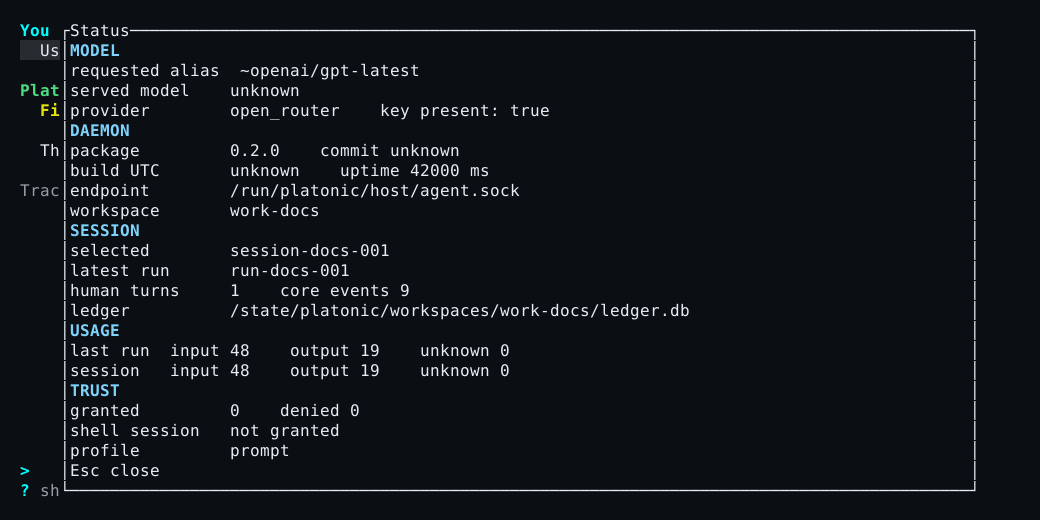
The audit view includes the exact ordered events already available to the client. It does not replace the offline durable record. Use replay when the client or server is not running.
Finish or leave
Section titled “Finish or leave”q with an empty composer, Esc from the idle main view, /quit, and /exit close the TUI. Closing it leaves the server and durable thread available.
plato thread stop THREAD_ID is different: for a child it cancels active work, runs the server-owned repository integration and cleanup path, and writes a durable stop record. A profile home rejects thread.stop; close the client instead.
For exact syntax and context-sensitive controls, use the command reference and TUI reference.