
Approvals
User docs
This page is part of the Platonic 0.2.2 operating guide.
The Platonic server evaluates every tool proposal against server-owned run limits: the configured toolset, any durable thread path and network grants, and the applicable approval policy and profile. A client can answer a prompt; it cannot widen those limits.
Decide from the proposed effect
Section titled “Decide from the proposed effect”In the TUI, the approval pane shows the tool, reason, effect class, and a bounded preview. Read the command, path, URL, working directory, and timeout before deciding.
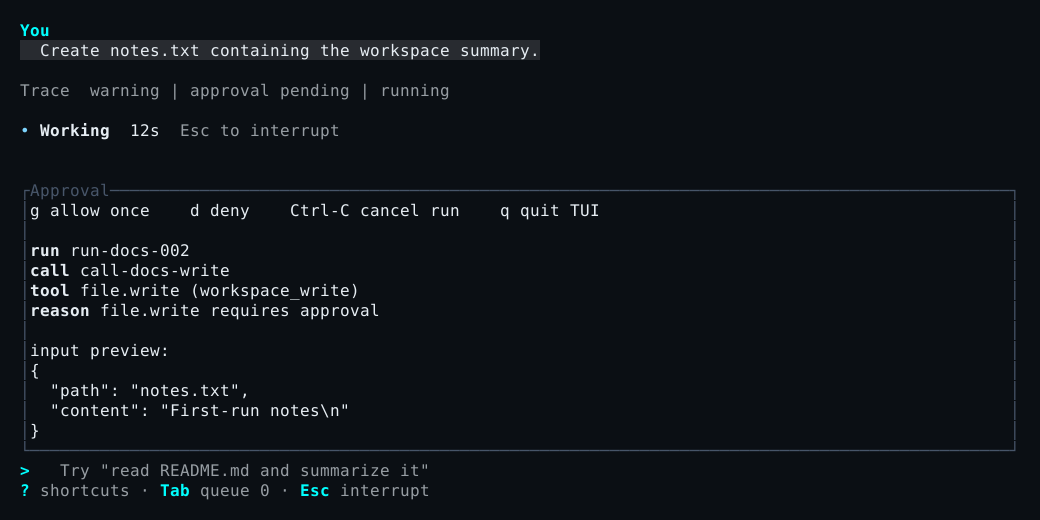
| Key | Decision |
|---|---|
g |
Grant this request once |
s |
Grant this exact shell.exec request and later shell calls in this session until the server exits |
d |
Deny this request |
Esc |
Cancel the active run |
q |
Exit the TUI without resolving the pending request |
The s action is available only for shell.exec. Its grant is limited to the selected session and current server lifetime. It does not apply to another session or survive a server restart.
One-shot mode prompts approve TOOL (REASON)? [y/N]. Only y or yes grants; every other answer denies.
Know the shipped defaults
Section titled “Know the shipped defaults”| Proposal | Default result |
|---|---|
| Enabled read-only file operation | Allowed |
| Enabled workspace write | Requires approval |
Exact enabled shell.exec |
Requires explicit local approval |
Exact enabled web.fetch |
Requires explicit local approval |
| Disabled or unknown tool | Denied |
| Secret access or an otherwise denied effect | Denied |
An approval prompt is not proof that an operation is harmless. It means the server has admitted a bounded decision point inside the authority already assigned to the thread.
Use yolo narrowly
Section titled “Use yolo narrowly”Yolo mode auto-grants only server-classified, approval-required workspace writes and the exact shipped shell.exec tool. A direct write or edit of root PLATONIC.md still prompts.
Yolo never auto-grants web.fetch, network effects, secret access, arbitrary external-side-effect tools, a disabled or unknown tool, or a server denial. It cannot expand a thread’s toolset, worktrees, granted paths, or network authority.
Start a one-shot or new local TUI session in yolo mode with --yolo. In the TUI, /yolo on and /yolo off change the selected session’s profile for the current server lifetime. Before an unattached session exists, the command selects the profile for its next fresh run. These commands do not rewrite a thread’s immutable approval policy; a thread explicitly admitted under the yolo policy remains governed by that policy.
plato --yolo "apply the requested edits and run the focused tests"--yolo cannot be combined with --remote. After attaching, use /yolo on only when the narrower behavior above is appropriate. The footer and /status show the selected session’s live profile.
Approval grants and denials are recorded in the ledger. Inspect them with v, /status, or offline replay. For the architectural authority boundary, see runtime boundaries.