
First run
User docs
This is one linear OpenRouter journey through Platonic 0.2.2. It uses the
built-in configuration and OPENROUTER_API_KEY; do not add a plato.toml for
this path.
Release track: Install the supported 0.2.2 bundle with the tagged quickstart. Keep its tag, target, checksum, and commands together.
1. Install the 0.2.2 commands
Section titled “1. Install the 0.2.2 commands”Follow the tagged quickstart for your supported target, then keep its install
directory on this terminal’s PATH:
export PATH="$HOME/.local/bin:$PATH"platonic --versionplato --versionplato-tui --versionCheckpoint: each line contains the exact 40-character commit and UTC build
date. platonic reports product version 0.2.2; the two Plato Agent clients
retain their independent package version 0.2.0. platonic keeps its commit and
date in parentheses. Keep this terminal’s PATH for the rest of the journey.
platonic 0.2.2 (<source-commit>, <YYYY-MM-DD>)
plato 0.2.0 <source-commit> <YYYY-MM-DD>
plato-tui 0.2.0 <source-commit> <YYYY-MM-DD>
2. Give the server its OpenRouter credential
Section titled “2. Give the server its OpenRouter credential”Create an OpenRouter API key and save only that key in a private file outside the workspace. In the terminal that will run the server, read it into the documented environment boundary without printing it:
chmod 0600 "$HOME/.config/platonic/openrouter-key"IFS= read -r OPENROUTER_API_KEY < "$HOME/.config/platonic/openrouter-key"export OPENROUTER_API_KEYtest -n "$OPENROUTER_API_KEY" && printf '%s\n' 'OpenRouter key: available (value not shown)'Checkpoint: the last command prints only:
OpenRouter key: available (value not shown)
The secret belongs in the platonic serve environment. Do not put it in the
workspace, a command argument, a transcript, or a log. Server-run shell tools
receive a scrubbed environment and do not inherit provider credentials.
3. Start Platonic
Section titled “3. Start Platonic”Keep the credential terminal open and start the one host server in the foreground:
platonic serveCheckpoint: before waiting for clients, the server prints these two lines; the socket prefix varies by host:
daemon_scope: host
socket_path: <runtime-directory>/platonic/host/agent.sock
Leave this process running. The server, not the TUI, owns provider calls, tools, approvals, and ledger writes.
4. Create and register a workspace
Section titled “4. Create and register a workspace”In a second terminal, make a harmless Git repository with one committed file:
mkdir -p "$HOME/platonic-first-run"cd "$HOME/platonic-first-run"git initprintf '%s\n' \  '# First-run workspace' \  '' \  'This repository is a harmless, read-only target for the Plato Agent first run.' \  > README.mdgit add README.mdgit -c user.name='Platonic First Run' \  -c user.email='first-run@invalid' commit -m 'Initial workspace'
platonic workspace create first-run "$PWD"platonic status --workspace "$PWD"
Checkpoint: workspace create returns one JSON object whose workspace
contains a stable id, the canonical root, a ledger_path, and
"health":"present". In the following status JSON, check the model object
without exposing the key:
{
  "requested_alias": "~openai/gpt-latest",
  "served_model": null,
  "provider_kind": "open_router",
  "key_present": true
}
served_model is null because this clean workspace has not completed a
provider response yet.
5. Create a profile and approve its home
Section titled “5. Create a profile and approve its home”From the registered workspace, run the client with no question or subcommand:
platoOn first use, Plato Agent asks for a profile name. Press Enter to accept the
workspace directory name. It creates that workspace-bound profile from the
resolved provider and tool defaults, then proposes the profile’s one durable
home with workspace-write authority. The generated profile and thread ids vary:
Profile name [platonic-first-run]:
Profile: platonic-first-run (<profile-id>)
profile.open <thread-id> (WorkspaceWrite): profile.open requires approval before authority is created
Approve profile home? [y/N/c]
Type y and press Enter. This approves creation of the durable home; it does
not approve every future tool call. Plato Agent prints
Home: <thread-id> (created) before entering the TUI.
Checkpoint: the Plato Agent TUI opens with an empty transcript and the composer ready for input.
6. Complete one read-only task
Section titled “6. Complete one read-only task”Submit this exact task in the composer:
Use only file.read to read README.md. Reply with its Markdown heading and the purpose sentence below it. Do not change files.Checkpoint: the transcript shows your task, a successful file.read tool
step, and a final answer containing both of these facts:
First-run workspace
This repository is a harmless, read-only target for the Plato Agent first run.
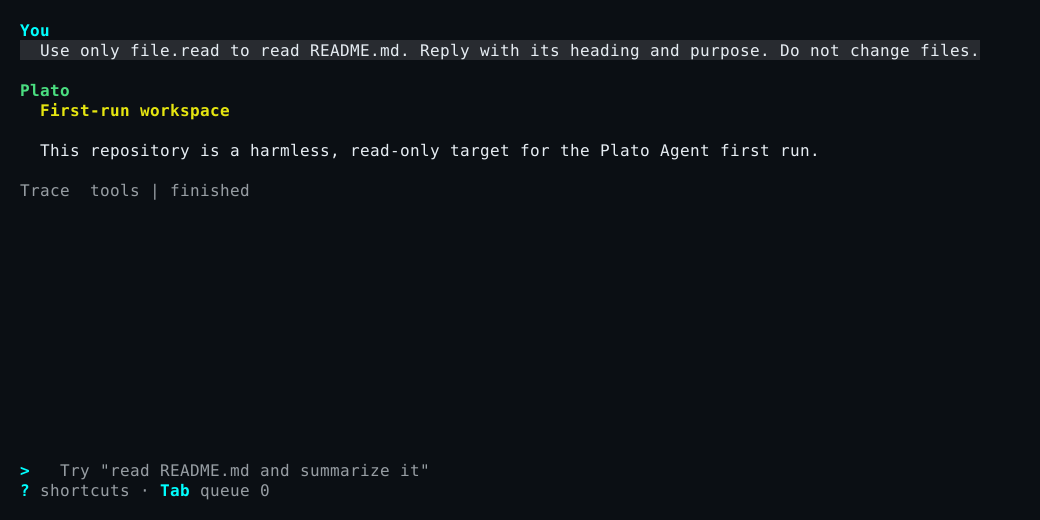
file.read is read-only and auto-allowed, so no tool-approval panel appears.
After the answer finishes, press q with an empty composer to leave the TUI,
then verify that the repository is unchanged:
git status --shortCheckpoint: git status --short prints nothing.
7. Inspect profile, status, transcript, and replay
Section titled “7. Inspect profile, status, transcript, and replay”List the profile and copy its id, then inspect its current revision. List the
durable threads and copy the home authority.thread_id:
platonic profile listprofile_id=<paste-profile-id>platonic profile status "$profile_id"plato thread listthread_id=<paste-thread-id>plato thread status "$thread_id"Checkpoint: profile status reports home_thread_id equal to thread_id and
revision 1. Thread status reports "thread_kind":"home", that profile id,
and the working directory under authority. After the completed task,
live.loaded is true and live.current_turn_id is null.
Reattach to the same live thread:
plato --remote "$thread_id"Checkpoint: the TUI reloads the task, file.read step, and final answer.
Press q again after inspecting it.
Now read the workspace ledger:
plato replayCheckpoint: replay begins with a session_id and run_id, includes
final_phase: Finished, the user message, tool_call file.read, its tool
result, and the final assistant message. Replay is read-only: it performs no
provider request and runs no tool.
8. Prove the restart boundary
Section titled “8. Prove the restart boundary”Stop the idle server, then replay with the credential removed from this child command:
platonic shutdown --workspace "$PWD"env -u OPENROUTER_API_KEY plato replayCheckpoint: shutdown prints {"result":"shutdown"}, and offline replay
still prints the same finished run.
Start platonic serve again from the credential terminal. In the workspace
terminal, inspect the same records, then reopen Plato Agent:
platonic status --workspace "$PWD"platonic profile status "$profile_id"plato thread listplato replayplatoCheckpoint: before plato starts, the same home appears with
live.loaded:false because live execution state belongs to one server process.
Plato Agent selects the existing profile without another creation or approval
prompt, prints Home: <thread-id> (reused), and attaches that same home. Submit
Reply with exactly: home reused. and verify the new turn completes. This loads
the durable home into the new server process without minting another root.
Verified 0.2.2 released-product proof
Section titled “Verified 0.2.2 released-product proof”The public #588 completion record is the source for this redacted journey. Credential values, local paths, exact effect bytes, and minted thread and run ids are omitted here.
- Install. The proof used the published Platonic 0.2.2 bundle, built from the exact tagged source.
- Bounded task. One profile home dispatched one child with fewer worktrees and tools, no network authority, and one local approval for the admitted effect.
- Restart and reuse. A zero-effect child run was interrupted by a server restart. Recovery reused the durable child authority and exact committed parent follow-up, completed the effect once, and returned one typed result.
- Replay. Offline
plato replayverified the spawn, follow-up, interruption, recovery, and parent-consumption runs without provider or tool IO. The parent consumed the typed return without repeating the effect.
Recover by symptom
Section titled “Recover by symptom”| Symptom | Recovery |
|---|---|
| A 0.2.2 archive download returns HTTP 404 | Use the exact platonic-v0.2.2 tag and target name from the tagged quickstart; no other targets are published. |
platonic serve reports a missing provider key, or status shows "key_present":false |
Stop the idle server. Load OPENROUTER_API_KEY in the terminal that will own platonic serve, verify only that it is nonempty, and restart the server. |
plato reports workspace_unregistered |
Return to the intended Git repository and run platonic workspace create first-run "$PWD" once. If the name is already used, inspect platonic workspace list instead of creating a competing record. |
| Profile creation reports that the provider key is unavailable | Load the configured key into the platonic serve environment, restart the idle server, and rerun bare plato. No incomplete profile row is retained. |
| Home creation reports that the directory is not a Git repository or has no usable commit | Complete the git init, git add, and initial commit commands above, then rerun bare plato. |
profile home denied appears |
Review the proposed home authority. To retry a deliberate denial, use platonic profile open PROFILE_ID --idempotency-key NEW_KEY --approve; do not edit server state. |
| The task fails before a final answer | Check platonic status --workspace "$PWD". Confirm provider_kind is open_router and key_present is true; then reopen the same profile home and submit a deliberate new turn. The failed attempt remains in the ledger. |
plato replay reports no sessions |
Finish one task from this registered workspace first. Replay selects that workspace’s latest recorded session. |
Continue with the User operations guide for daily operation, approvals, and provider choices, or the Developer guide for server, protocol, and ledger internals.